Designing Enterprise AI Agent Workflows: CLAUDE.md, Rules, Skills, Subagents, and Worktrees
Managing token budget efficiency while preventing context window degradation is one of the most critical operational challenges facing senior AI software engineers.
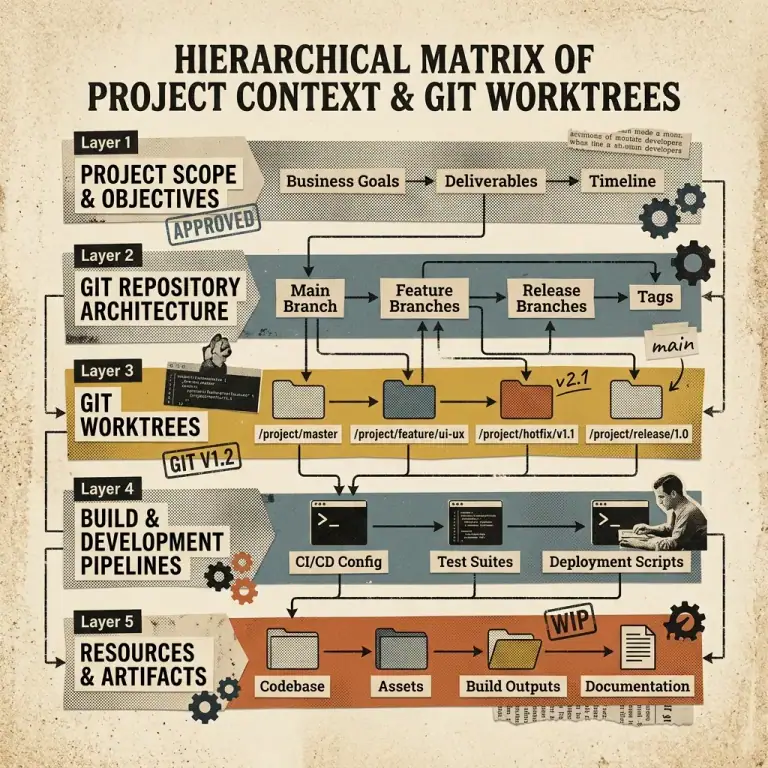
Anthropic’s official development guidelines emphasize dividing project context into a 5-Layer Governance Hierarchy: CLAUDE.md, path-scoped directory rules (.claude/rules/), modular skill playbooks (SKILL.md), isolated subagents, and parallel Git worktrees.
The 5-Layer Governance Architecture
 ┌────────────────────────────────────────────────────────────────────────┐
 │                   THE 5-LAYER AGENT GOVERNANCE MATRIX                  │
 └───────────────────────────────────┬────────────────────────────────────┘
                                     │
 LAYER 1: Core Repo Instructions  ───► │ CLAUDE.md (<200 lines, high priority)
 LAYER 2: Path-Scoped Guidelines  ───► │ .claude/rules/*.md (Dynamic glob match)
 LAYER 3: Modular Skill Bundles   ───► │ .claude/skills/SKILL.md (Explicit tool execution)
 LAYER 4: Isolated Subagents      ───► │ Custom subagent context windows
LAYER 5: Parallel Workspace ───► │ Git Worktrees (`git worktree add -b ...`)| Governance Layer | Location | Loading Trigger | Ideal Use Case |
|---|---|---|---|
| Layer 1: CLAUDE.md | Root repository directory | Always loaded at session launch | Build commands, style guide, high-level rules |
| Layer 2: Path Rules | .claude/rules/*.md | File path glob pattern match | API route standards, schema conventions |
| Layer 3: Skills | skills/*/SKILL.md | Slash command or tool invocation | Step-by-step migration playbooks |
| Layer 4: Subagents | Custom subprocess | Spawned by agent or user | High-noise log analysis, web research |
| Layer 5: Worktrees | .git/worktrees/ | Parallel background execution | Non-blocking background feature development |
1. Writing Effective CLAUDE.md Files
Keep your root CLAUDE.md under 200 lines. Avoid prose padding; use concise bullet points and exact shell commands.
# Repository Guidelines for Nadhebe

## Build & Test Commands
- Development server: `npm run dev`
- Production build: `npm run build`
- Type checking & Linter: `npm run check`

## Code Style & Formatting
- Framework: Astro 5.0 with Tailwind CSS v3
- TypeScript: Strict mode (`noImplicitAny: true`)
- Component Imports: Use `@/components/...` alias
2. Dynamic Path-Scoped Rules (.claude/rules/)
Create modular rule files inside .claude/rules/ with YAML frontmatter specifying file path glob patterns:
---
paths:
  - "src/pages/api/**/*.ts"
  - "src/lib/server/**/*.ts"
---
# Server-Side API Security Rules
- Validate all incoming request body JSON with Zod schemas.
- Always handle errors gracefully and return standardized `{ success: false, error: string }` JSON.
3. Parallel Execution with Git Worktrees
When delegating background tasks to subagents, isolate filesystems using Git Worktrees to avoid file collisions:
# Create an isolated worktree branch for an AI agent refactoring task
$ git worktree add -b feature/agent-refactor ../agent-workspace-1 main

# Execute Claude Code inside the isolated worktree directory
$ cd ../agent-workspace-1
$ claude "Refactor legacy database handlers to use TypeScript async/await."