How to Analyze Meta Tags for SEO: Step-by-Step Tutorial
Auditing HTML metadata is a fundamental technical SEO task. Properly structured meta tags provide search engine crawlers and social media platforms with clear signals about your content’s topic, primary keywords, and visual representation.
In this tutorial, we will walk through a step-by-step audit process using our interactive Meta Tag Analyzer to inspect title length, meta description character counts, canonical tags, and OpenGraph previews.
Key Takeaways
- Character Count Discipline: Keep title tags between 50–60 characters and descriptions between 140–160 characters.
- Canonical Consistency: Always verify that
rel="canonical"matches the exact protocol (https://) and URL path. - Social Card Verification: Test
og:imageresolution (1200×630 px) to prevent blurry thumbnail rendering on X and LinkedIn. - Automated Validation: Use client-side tooling to eliminate syntax errors like unclosed quote marks or missing tags.
Step-by-Step Audit Workflow
sequenceDiagram
    participant Dev as Web Developer / Marketer
    participant Tool as Meta Tag Analyzer
    participant SERP as Search Engine Preview

    Dev->>Tool: Paste Page Title, Description & URLs
    Tool->>Tool: Calculate Character Counts & Pixel Widths
    Tool-->>SERP: Generate Live Google & Social Previews
    Dev->>Tool: Adjust Length to Prevent Truncation
    Dev->>Dev: Copy Optimized HTML Head Tags
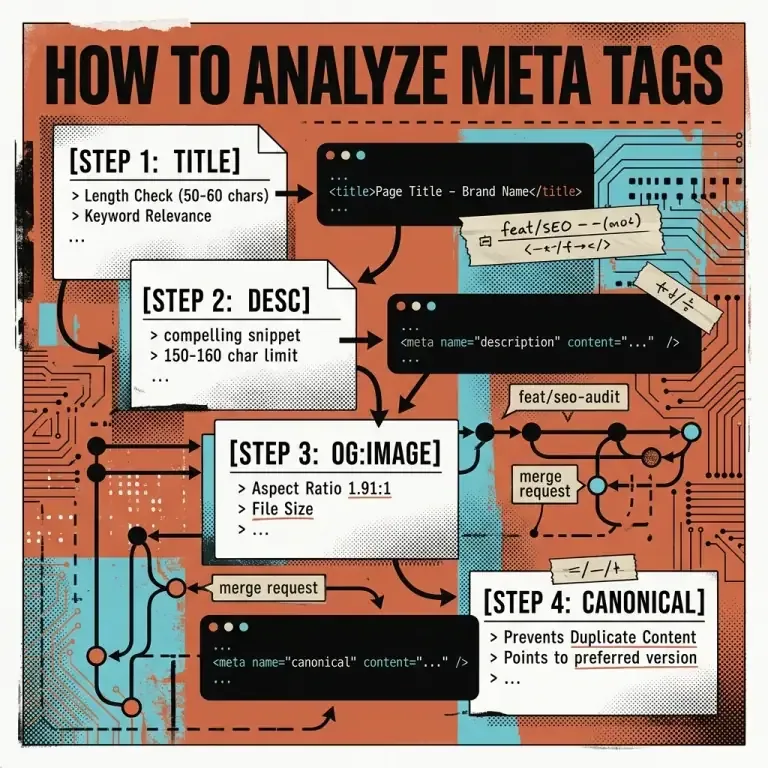
Step 1: Audit Title Tag Length & Keyword Placement
Open the Meta Tag Analyzer and input your page title.
- Check the real-time character counter. Aim for 50 to 60 characters.
- Verify that your primary target keyword is positioned in the first 3–5 words.
- Ensure the brand name is placed at the end using a clean separator such as
|or–.
Step 2: Validate Meta Description Appeal & Length
Input your page meta description into the analyzer.
- Verify character count stays within 140 to 160 characters.
- Ensure the description contains a compelling call to action (e.g. “Learn how to…”, “Discover step-by-step…”).
- Avoid generic filler text; make every word informative.
Step 3: Inspect OpenGraph & Twitter Card Tags
Rich social media previews increase social engagement and referral traffic.
- Specify
og:imagewith a high-contrast 1200×630 px image URL. - Confirm
twitter:cardis set tosummary_large_imagefor full-width card rendering. - Test your domain preview inside our live Meta Tag Analyzer social card preview box.
Step 4: Copy Generated HTML Tags to Your Project
Once all parameters pass validation:
- Click Copy HTML in the code output panel.
- Paste the generated meta block directly inside your template’s
<head>element.
<title>How to Analyze Meta Tags for SEO: Step-by-Step Tutorial | Nadhebe</title>
<meta name="description" content="Learn how to systematically audit HTML title tags, meta descriptions, and OpenGraph social cards." />
<link rel="canonical" href="https://nadhebe.com/tutorials/how-to-analyze-meta-tags-for-seo/" />

<!-- OpenGraph Social Tags -->
<meta property="og:type" content="article" />
<meta property="og:title" content="How to Analyze Meta Tags for SEO: Step-by-Step Tutorial" />
<meta property="og:description" content="Learn how to systematically audit HTML title tags and OpenGraph cards." />
<meta property="og:url" content="https://nadhebe.com/tutorials/how-to-analyze-meta-tags-for-seo/" />
<meta property="og:image" content="https://nadhebe.com/images/how-to-analyze-meta-tags-hero.webp" />
Frequently Asked Questions
Why does Google rewrite my meta description?
If Google determines that your meta description does not directly address the user’s specific search query, its search algorithms will automatically generate a dynamic snippet from page text.
Can I test draft pages that are not live yet?
Yes. Our client-side Meta Tag Analyzer allows you to input raw text and preview titles, descriptions, and OpenGraph cards locally before deploying code.
References
- Google Search Central — Create good titles and snippets in search results: https://developers.google.com/search/docs/appearance/snippet
- W3C HTML5 Specification — The meta element: https://www.w3.org/TR/html52/document-metadata.html#the-meta-element