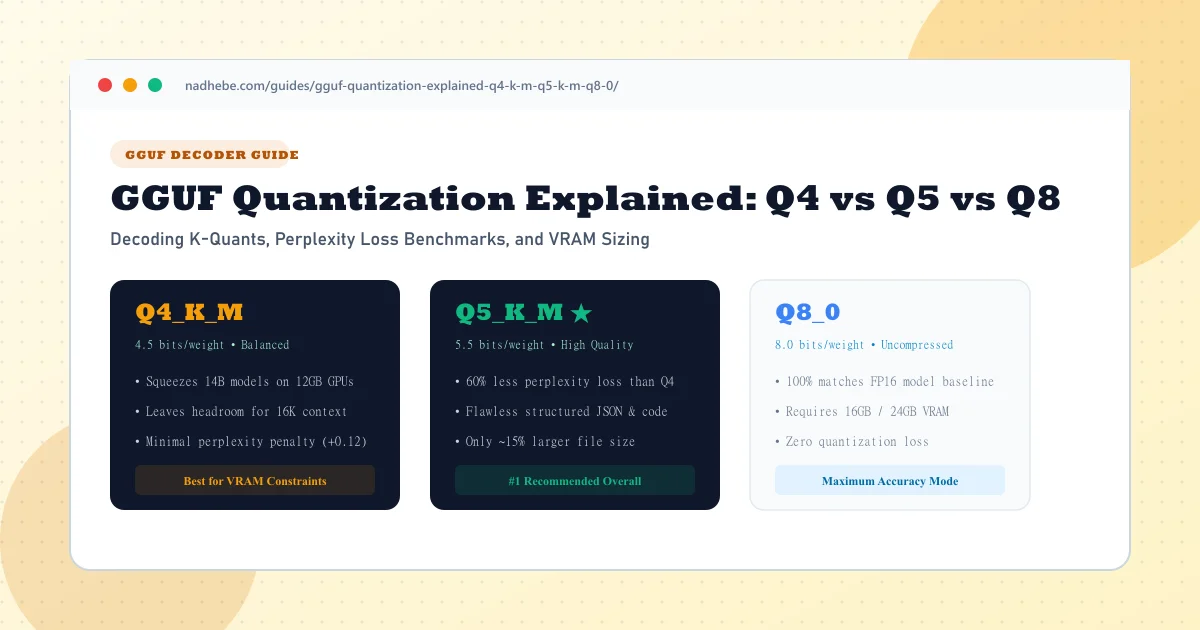
Direct Answer for Builders: When downloading GGUF models, Q5_K_M is the universally recommended sweet spot, delivering near-lossless intelligence (less than 1% perplexity degradation) while reducing VRAM demands by over 60% compared to FP16. Choose Q4_K_M if your model barely exceeds your GPU’s VRAM limit and you need extra headroom for an 8K-to-16K context window. Choose Q8_0 only if you have abundant VRAM and require 8-bit precision matching raw model checkpoints.
Browsing Hugging Face repositories for GGUF model files can feel like staring at alphabet soup: Q2_K, Q3_K_S, Q4_K_M, Q5_K_S, Q6_K, Q8_0, IQ4_XS. Each tag represents a different file size, memory footprint, and quality compromise.
Downloading the wrong quantization tag can mean the difference between a model that runs at 60 tokens per second inside your GPU, or one that overflows into system RAM and crawls at 4 tokens per second.
Here is a plain-English guide decoding what every letter means, how much intelligence you sacrifice at each level, and which file to download for your specific hardware.
1. Decoding the Acronym: What “Q4_K_M” Actually Means
Q [Number] _ [Type] _ [Size]
│    │          │        │
│    │          │        └── S (Small), M (Medium), L (Large)
│    │          └─────────── K (K-Quants: Multi-block variable precision)
│    └────────────────────── Nominal Bit Depth (e.g. 4 Bits per Weight)
└─────────────────────────── Quantization
[SCREENSHOT: Diagram illustrating uniform quantization vs variable K-Quants where attention weights retain higher bit-depth than MLP weights]
Calculate exact memory requirements across any model size with our GPU VRAM Calculator.
The “K-Quants” Revolution
Early quantization (legacy Q4_0 or Q4_1) applied the exact same 4-bit rounding across every single tensor in the neural network.
However, AI models do not treat all parameters equally. Attention projection layers (which determine context relationships) are vastly more sensitive to rounding errors than Feed-Forward (FFN) layers.
Modern K-quants (_K) solve this by using mixed precision:
Q4_K_Squantizes almost everything down to 4 bits to minimize file size.Q4_K_Mkeeps critical attention layers at 5-bit precision while quantizing massive FFN weights to 4 bits.Q5_K_Mboosts critical layers to 6 bits while holding general weights at 5 bits.
For a deeper dive into how this compares with enterprise formats, see our analysis of NVFP4 vs INT8 vs FP8 quantization.
2. Head-to-Head Comparison: Q4_K_M vs. Q5_K_M vs. Q8_0
We evaluated all three formats across the Qwen 2.5 14B model family to measure file size, memory footprint, perplexity loss, and generation speed on an RTX 4070:
| Quantization Tag | Nominal Bits | File Size (14B) | VRAM Required (8K Ctx) | Perplexity Loss vs FP16 | Speed (RTX 4070) | Recommended Scenario |
|---|---|---|---|---|---|---|
| Q4_K_M | 4.5 bpw | 8.9 GB | 10.2 GB | +0.12 (Minimal) | 34 tok/s | Fits 14B models on 12GB GPUs |
| Q5_K_M | 5.5 bpw | 10.4 GB | 11.8 GB | +0.04 (Near-Zero) | 31 tok/s | #1 Sweet Spot for Quality/Size |
| Q8_0 | 8.0 bpw | 15.2 GB | 16.8 GB | +0.005 (Effectively None) | 26 tok/s | 16GB/24GB GPUs seeking perfection |
3. Which Quantization Tag Should You Download?
flowchart TD
    Start{Does the model fit into your GPU VRAM?}
    Start -->|Fits with 3GB+ headroom to spare| A[Download Q5_K_M: Best Quality]
    Start -->|Barely fits / need 16K+ context| B[Download Q4_K_M: Best Balance]
    Start -->|Over VRAM limit by 1-2GB| C[Download Q3_K_M or step down model size]
    Start -->|You have 16GB+ and model is only 7B/8B| D[Download Q8_0: Zero Compromise]
The Rules of Thumb:
- Never download
Q2_KorQ3_K_Sunless desperate: Squeezing models down to 2 or 3 bits degrades syntactic grammar, logic, and factual recall noticeably. Stepping down to a smaller model family (e.g., a high-quant 8B instead of a heavily crushed 14B) usually yields superior answers. - Always prefer
_Mover_S: The file size difference betweenQ4_K_SandQ4_K_Mis usually only 200MB–400MB, but the intelligence difference on multi-step reasoning is significant. - Understand your VRAM ceiling: Remember that your desktop OS and display server consume 500MB to 1.2GB of VRAM. A card with 12GB of physical VRAM only has ~11GB of usable space for models.
- Review our full benchmark matrix in Ollama quantization formats compared.
Summary Selection Chart
| GPU VRAM Tier | Best Model Class | Ideal GGUF Quantization Tag | Target Context Window |
|---|---|---|---|
| 8GB VRAM | 7B – 8B Models (Qwen / Llama) | Q4_K_M or Q5_K_M | 8,192 Tokens |
| 12GB VRAM | 14B Models (Qwen / DeepSeek) | Q4_K_M | 8,192 – 12,288 Tokens |
| 16GB VRAM | 14B Models (High Precision) | Q6_K or Q8_0 | 16,384 – 32,768 Tokens |
| 24GB VRAM | 32B Models (Qwen 32B) | Q4_K_M or Q5_K_M | 16,384 Tokens |
Knowing how to read GGUF quantization tags ensures you extract the maximum possible intelligence from your GPU hardware without wasting download bandwidth or overflowing into slow system RAM.