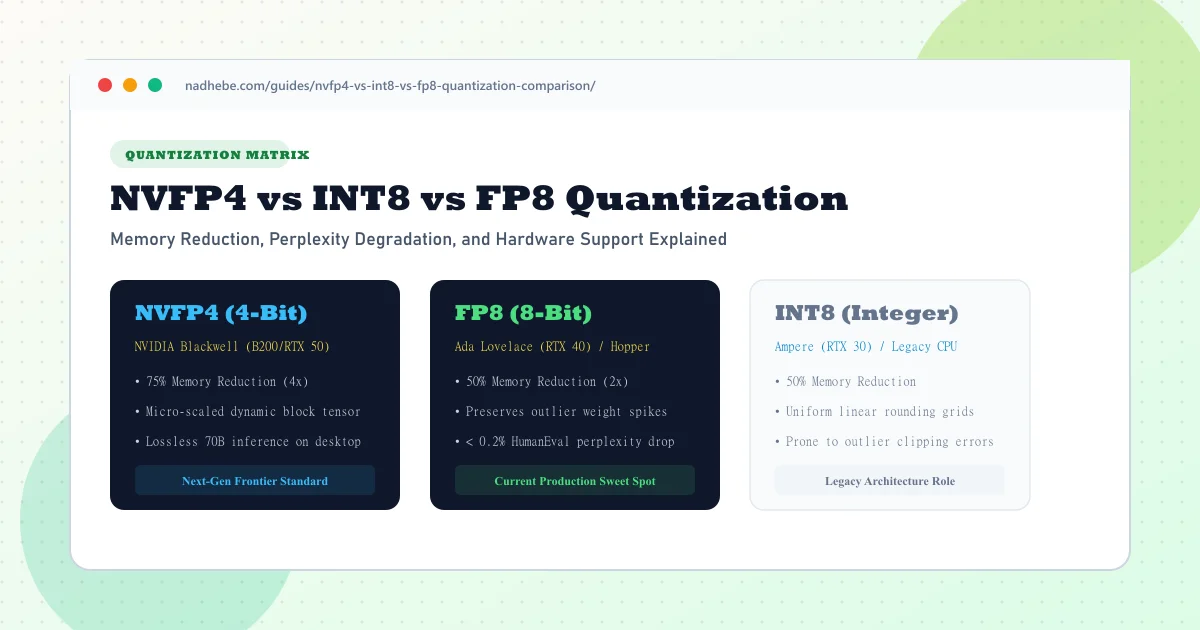
Direct Answer for Engineers: FP8 is currently the best general-purpose quantization format for modern GPUs (NVIDIA Ada Lovelace RTX 40-series and Hopper H100), delivering 50% memory savings with virtually zero perplexity degradation. INT8 is a legacy integer format best suited for older hardware lacking native floating-point Tensor Cores. NVFP4 is NVIDIA’s groundbreaking 4-bit floating-point format engineered for Blackwell architectures (B200, RTX 50-series), providing a 4x memory reduction and doubling token throughput compared to FP16.
Quantization is the single most effective lever for reducing the cost and latency of Large Language Model inference. By converting high-precision 16-bit floating-point weights (FP16/BF16) into compact 8-bit or 4-bit representations, developers can run larger, more intelligent models on consumer hardware and double the concurrent throughput of cloud GPU clusters.
However, the proliferation of competing numerical formats—INT8, FP8 (E4M3/E5M2), and NVFP4—has created widespread confusion about which format to choose for a specific GPU generation.
Here is an architectural comparison of all three formats, their hardware requirements, and when to use each in production.
1. Number Representation: Understanding the Bits
To understand why these formats perform differently, examine how each assigns its bits:
[FP16 Standard: 16 Bits]
1 Sign Bit | 5 Exponent Bits (Dynamic Range) | 10 Mantissa Bits (Precision)

[FP8 (E4M3): 8 Bits]
1 Sign Bit | 4 Exponent Bits | 3 Mantissa Bits (Optimized for Weights & Forward Inference)

[INT8: 8 Bits]
1 Sign Bit | 7 Integer Magnitude Bits (Fixed Linear Step Size)

[NVFP4: 4 Bits + Micro-Scaling Block]
1 Sign Bit | 2 Exponent Bits | 1 Mantissa Bit + Shared FP8 Scaling Factor per 16 Elements
[SCREENSHOT: Diagram comparing the numerical dynamic range distribution of FP8 floating point vs INT8 uniform integer grids]
Check how these formats impact your specific graphics card using our GPU VRAM Calculator.
The “Outlier Activation” Problem: Why FP8 Defeated INT8
Large language models naturally develop “outlier features”—rare activation values that are 20x to 100x larger than average weights.
- In INT8, uniform linear quantization forces these massive outliers to clip or squishes the remaining 99.9% of normal weights into tiny rounding buckets, resulting in noticeable perplexity degradation.
- In FP8, the logarithmic exponent bits naturally capture both tiny gradient values and massive outlier spikes, preserving reasoning accuracy without manual outlier separation techniques like SmoothQuant.
For an in-depth mathematical comparison with earlier quantization schemes, read our guide on FP4 vs FP8 vs INT4 quantization.
2. Head-to-Head Architecture Comparison
| Evaluation Metric | INT8 (Integer) | FP8 (E4M3 / E5M2) | NVFP4 (NVIDIA Micro-Scaled) |
|---|---|---|---|
| Bits per Parameter | 8 Bits (1 Byte) | 8 Bits (1 Byte) | 4 Bits (0.5 Bytes) |
| Memory Reduction vs FP16 | 2x (50% Savings) | 2x (50% Savings) | 4x (75% Savings) |
| Perplexity Degradation | Moderate (< 1.5% loss) | Near-Zero (< 0.2% loss) | Minimal (< 0.8% loss) |
| Outlier Handling | Poor (Requires clipping) | Exceptional (Floating-point exponent) | Exceptional (Micro-scaled blocks) |
| Native Hardware Support | Turing (RTX 20), Ampere (RTX 30) | Ada (RTX 40), Hopper (H100) | Blackwell (B100/B200, RTX 50) |
| Primary Production Role | Legacy CPU / older GPU inference | Current production standard | Next-generation frontier serving |
3. NVFP4: How NVIDIA Made 4-Bit Inference Lossless
Historically, pushing models down to 4-bit precision resulted in catastrophic degradation in complex multi-step reasoning, coding, and mathematical benchmarks.
NVIDIA solved this on the Blackwell architecture by introducing Micro-Scaled FP4 (NVFP4):
flowchart LR
    A["Raw Weight Vector (16 Elements)"] --> B["Extract Dynamic Range Scale"]
    B --> C["Store 16 Elements in NVFP4 (4 Bits each)"]
    B --> D["Store Shared Micro-Scale Factor in FP8 (8 Bits)"]
    C --> E["Tensor Core Fused Matrix Multiply (4x Speedup)"]
    D --> E
Rather than applying a single quantization scale across an entire tensor layer, NVFP4 applies micro-scaling factors across tiny blocks of 16 elements. This allows the model to compress weights to 4 bits while dynamically preserving local dynamic range.
A 70-billion parameter model like Llama 3.3 70B:
- Uncompressed FP16: ~140 GB VRAM (Requires two 80GB H100s)
- NVFP4: ~38 GB VRAM (Fits easily onto a single consumer RTX card or single PCIe GPU)
4. Decision Matrix: Which Quantization Should You Pick?
flowchart TD
    GPU{What GPU Architecture do you have?}
    GPU -->|Turing / Ampere: RTX 20/30 series| A[Use INT8 / GGUF Q4_K_M or Q8_0]
    GPU -->|Ada Lovelace: RTX 40 series / Hopper H100| B[Use FP8 E4M3 or GGUF Q5_K_M]
GPU -->|Blackwell: B100/B200 / RTX 50 series| C[Use NVFP4 for 4x Throughput]- If you are running an RTX 3060, 3080, or 3090: Use GGUF Q4_K_M or Q5_K_M via llama.cpp or Ollama. Your GPU lacks native FP8 Tensor Cores, so GGUF integer kernel optimizations yield the best performance. Learn more in our Ollama quantization formats comparison.
- If you are serving models on RTX 4080/4090 or cloud H100s: Choose FP8 (vLLM / TensorRT-LLM). It cuts your VRAM demands in half and doubles batch throughput with zero code modifications.
- If you have access to NVIDIA Blackwell infrastructure: Deploy NVFP4. It enables running 70B parameter models at speeds previously only achievable with 8B models.
Quantization is no longer a compromise—it is the foundational architecture of scalable AI inference.